Bank Accounts
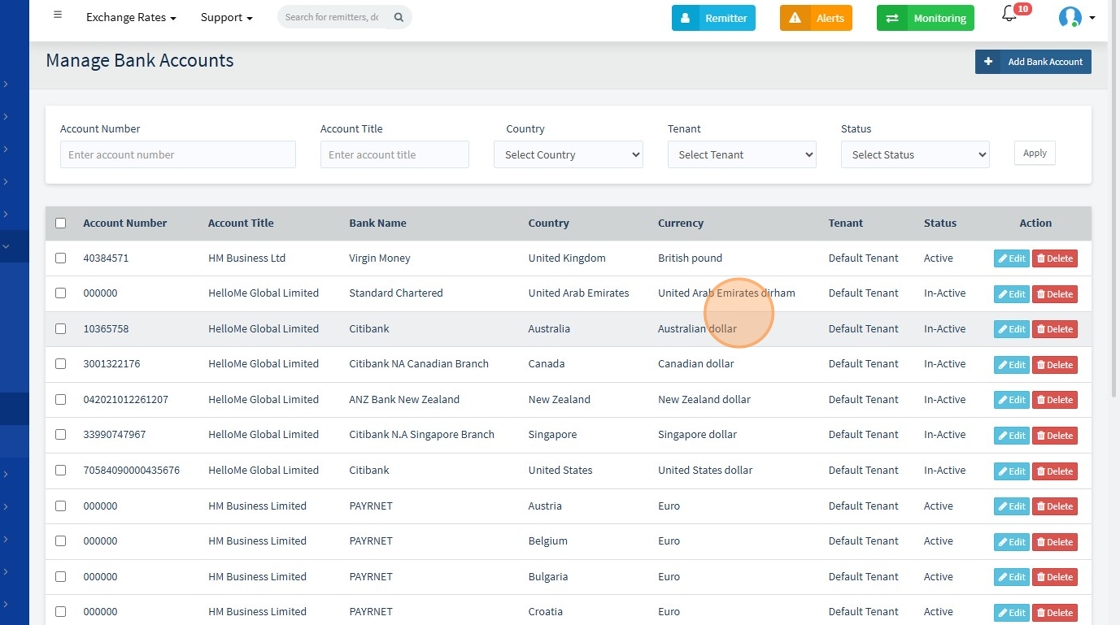
The Manage Bank Accounts sub-module is a centralized interface for configuring and managing all bank accounts used by HelloMe Money across tenants, currencies, and countries.
It supports both active and inactive accounts and allows designation of a country-level default account. This module is essential for treasury, finance, and system administration teams.
🎯 Purpose
- Maintain an organized list of all bank accounts used for operations.
- Associate bank accounts with tenants, currencies, and countries.
- Control account visibility and availability by toggling status.
- Designate default accounts for specific countries to automate routing.
🔍 Search & Filter Options
Filter or search records using:
| Field | Description |
|---|---|
| Account Number | Full or partial account number |
| Account Title | Name of the account holder or entity |
| Country | Country where the account is domiciled |
| Tenant | Linked tenant (e.g., Default Tenant) |
| Status | Filter by Active or Inactive accounts |
📋 Bank Account List View
Each row in the list displays the following:
| Field | Description |
|---|---|
| Account Number | The actual bank account number |
| Account Title | Legal or business name of the account holder |
| Bank Name | Financial institution (e.g., Virgin Money) |
| Country | Country where the bank account is held |
| Currency | Account currency (e.g., GBP, AED) |
| Tenant | Associated tenant (e.g., HelloMe Global) |
| Status | Active or Inactive status |
| Action | Edit or View button for account record |
1.
➕ Add Bank Account
Clicking "Add Bank Account" opens a form requiring entry of the following:
2. Click here.

3. Click "Set as default for country"

Required Fields
| Field | Description |
|---|---|
| Account Title * | Business or account holder name |
| Account Number * | The exact account number |
| Account Type | Current, Savings, etc. |
| IBAN Number | International Bank Account Number |
| Currency * | Operating currency (e.g., GBP, AED) |
| Sort Code | Common for UK-based accounts |
| Swift Code | International wire transfer code |
| BIC Code | Bank Identifier Code |
| Bank Name * | Name of the financial institution |
| Bank Code | Internal or local banking code |
| Bank Address | Full bank address |
| Country * | Registered country of the bank account |
| Tenant * | Tenant using this account |
| Notes | Internal notes or descriptions |
| Default Country Flag | Mark this as the country’s default payout account |
⚠️ All fields marked with an asterisk (*) are required.
4. Add bank Form
..."

📜 Recent Activity view
At the bottom of the edit screen, a Recent Activity Log shows audit entries for transparency. Each log captures:
- The user who made the update
- The timestamp of the change
- The change summary, e.g.:
5. Click "Recent Activity"
